I. Refer to official documentation

II. What is a virtual thread?
Objective : To support massive concurrent tasks (such as 1 million requests) with a small number of platform threads, thereby increasing throughput.
| type | illustrate |
|---|---|
| Platform Thread | JVM threads are mapped to operating system threads (OS threads), which are costly to create (by default, several hundred KB of stack space) and have a limited number (usually several thousand). |
| Virtual Thread | Lightweight threads internal to the JVM Thread.ofVirtual() are created by the JVM itself and are not directly bound to OS threads ; they can create millions of threads. |
Platform threads=real employees (small quantity, high cost)

Virtual threads=temporary workers (with a large number of tasks assigned to real employees)
Applicable scenarios:
| Scene | illustrate |
|---|---|
| 🟢 High-concurrency I/O tasks | Examples include HTTP requests, database queries, and Redis calls (which are often blocking but consume little CPU). |
| 🟢 Web server processes requests | Tomcat, Netty, Spring WebFlux, and other per-request-one-thread models |
| 🟢 Batch processing tasks | Such as synchronizing 100,000 data entries and processing logs. |
| 🟢 Calling multiple external services | Parallel calls to order, user, and inventory services and aggregation of results |
Not applicable scenarios:
| Scene | illustrate |
|---|---|
| 🔴 CPU-intensive tasks | For tasks such as image processing, encryption/decryption, and big data computing, use the platform’s thread pool (. |
| 🔴 Long-running infinite loop | The virtual thread scheduler may “starve” other tasks. |
| 🔴 JNI / Native code | The virtual thread will be suspended until the native method returns (blocking the platform thread). |
| 🔴 Holding a synchronized block for too long | It will block platform threads and reduce concurrency capabilities. |
III. Several uses
| Your needs | Recommended usage |
|---|---|
| Learning Virtual Threads | Thread.ofVirtual().start() |
| High-concurrency web requests, batch I/O | ✅ newVirtualThreadPerTaskExecutor() |
| CPU-intensive tasks (such as computation) | ❌ Don’t use virtual threads, use ForkJoinPool |
1、Thread.ofVirtual().start()
— The most basic way to create
Thread vt = Thread.ofVirtual()
    .name("worker")
    .start(() -> {
        System.out.println("Hello from " + Thread.currentThread());
        try {
            Thread.sleep(1000);
        } catch (InterruptedException e) {}
        System.out.println("Done");
    });

vt.join(); // Waiting to be completed
Applicable scenarios:
- Learning the principles of virtual threads
- Single, simple concurrent tasks
- No task management or resource recycling required
Not applicable scenarios:
- Batch tasks (e.g., 100,000 requests)
- Unified lifecycle management is needed
- High-concurrency services in production environments
suggestion:
Not recommended for production environments . It lacks resource pool management, cannot limit concurrency, and is prone to memory overflow.
2、Executors.newVirtualThreadPerTaskExecutor()
—The most recommended production-level usage
try (var executor = Executors.newVirtualThreadPerTaskExecutor()) {
    for (int i = 0; i < 10_000; i++) {
        executor.submit(() -> {
            Thread.sleep(Duration.ofSeconds(1));
            System.out.println("Task " + Thread.currentThread());
            return "result";
        });
    }
} // Waiting for all tasks to be completed
According to official sources:
try (ExecutorService myExecutor = Executors.newVirtualThreadPerTaskExecutor()) {
    Future<?> future = myExecutor.submit(() -> System.out.println("Running thread"));
    future.get();
    System.out.println("Task completed");
    // ...
Applicable scenarios:
| Scene | illustrate |
|---|---|
| 🟢 Web request processing | One virtual thread is started for each HTTP request (default in Spring Boot 6+). |
| 🟢 Batch I/O operations | Such as reading 100,000 files, calling external APIs |
| 🟢 Message queue consumption | Each message is processed by a virtual thread. |
| 🟢 Redis / DB Batch Query | In conjunction with multiGet or pipeline use |
Advantages:
- Automatically manage the lifecycle of virtual threads
try-with-resourcesAutomaticallyclose()and wait for all tasks to complete.- No need to worry about resource leaks
To summarize in the words of the official documentation:
- This thread pool creates a new virtual thread for each submitted task.
- It is particularly suitable for server scenarios or batch concurrent tasks .
- You can easily submit thousands of tasks without the resource constraints of traditional threads.
suggestion:
The most recommended virtual threading approach for production environments! Especially suitable for: high concurrency + I/O intensive + short tasks.
3. Limit concurrency using semaphores
Some students might wonder if virtual threads can be pooled like platform threads. The official explanation for this is mentioned many times in the official documentation, stating that the two should not be the same concept. You can think of the platform thread pool as “workers” that extract tasks from the queue and process them, and the virtual thread as the task itself.
If you want to limit concurrency, similar to a thread pool used by platform threads, you can use semaphores to limit it:
Semaphore sem = new Semaphore(10);
...
Result foo() {
    sem.acquire();
    try {
        return callLimitedService();
    } finally {
        sem.release();
    }
}
Some students might think that using semaphores for limiting behavior is quite different from using a thread pool, and the official documentation provides some helpful insights:
Simply blocking some virtual threads with a semaphore might seem fundamentally different from submitting tasks to a fixed thread pool, but it’s not. Submitting a task to a thread pool queues it for later execution, while a semaphore (or any other blocking synchronization construct used for this purpose) internally creates a queue of threads blocked by the semaphore, reflecting a queue of tasks waiting to be executed by pool threads. Since virtual threads are tasks, the final structure is equivalent.
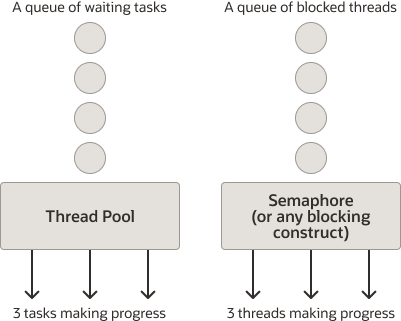
4. More other uses can be found on the official website.
Thread.Builder builder = Thread.ofVirtual().name("MyThread");
Runnable task = () -> {
    System.out.println("Running thread");
};
Thread t = builder.start(task);
System.out.println("Thread t name: " + t.getName());
t.join();
The following example creates and starts two virtual threads with:
Thread.Builder builder = Thread.ofVirtual().name("worker-", 0);
Runnable task = () -> {
    System.out.println("Thread ID: " + Thread.currentThread().threadId());
};

// name "worker-0"
Thread t1 = builder.start(task);
t1.join();
System.out.println(t1.getName() + " terminated");

// name "worker-1"
Thread t2 = builder.start(task);
t2.join();
System.out.println(t2.getName() + " terminated");
Output:
Thread ID: 21
worker-0 terminated
Thread ID: 24
worker-1 terminated
I want to make multiple outbound calls to different services simultaneously:
void handle(Request request, Response response) {
    var url1 = ...
    var url2 = ...

    try (var executor = Executors.newVirtualThreadPerTaskExecutor()) {
        var future1 = executor.submit(() -> fetchURL(url1));
        var future2 = executor.submit(() -> fetchURL(url2));
        response.send(future1.get() + future2.get());
    } catch (ExecutionException | InterruptedException e) {
        response.fail(e);
    }
}

String fetchURL(URL url) throws IOException {
    try (var in = url.openStream()) {
        return new String(in.readAllBytes(), StandardCharsets.UTF_8);
    }
}
IV. Monitoring memory usage
Simulate 100,000 virtual threads
import java.lang.management.ManagementFactory;
import java.lang.management.MemoryMXBean;
import java.lang.management.MemoryUsage;
import java.util.concurrent.ExecutorService;
import java.util.concurrent.Executors;

public class VirtualThreadTest {

    // Method 1: Check the current JVM memory usage
    public static void printMemoryUsage(String phase) {
        MemoryMXBean memoryMXBean = ManagementFactory.getMemoryMXBean();
        MemoryUsage heapMemory = memoryMXBean.getHeapMemoryUsage();
        System.out.printf("[%s] Heap Memory Used: %d MB / %d MB%n",
                phase,
                heapMemory.getUsed() / (1024 * 1024),
                heapMemory.getMax() / (1024 * 1024));
    }

    // Method 2: Create virtual threads to execute tasks
    public static void runVirtualThreads(int taskCount) throws InterruptedException {
        ExecutorService executor = Executors.newVirtualThreadPerTaskExecutor();
        for (int i = 0; i < taskCount; i++) {
            int finalI = i;
            executor.submit(() -> {
                System.out.printf("Virtual thread [%s] executing task %d%n",
                        Thread.currentThread(),
                        finalI);
                try {
                    Thread.sleep(1000); // Simulate IO blocking
                } catch (InterruptedException e) {
                    Thread.currentThread().interrupt();
                }
            });
        }
        executor.shutdown();
        while (!executor.isTerminated()) {
            Thread.sleep(100);
        }
    }

    // Method 3: Loop through memory (simulating GC reclamation effect)
    public static void monitorMemory(int seconds) throws InterruptedException {
        for (int i = 0; i < seconds; i++) {
            printMemoryUsage("Monitoring");
            System.gc(); // GC is recommended, it may not execute immediately
            Thread.sleep(1000);
        }
    }

    // Main method test
    public static void main(String[] args) throws Exception {
        // 1. Initial memory
        printMemoryUsage("Initial");

        // 2. Create 10,000 virtual thread tasks
        runVirtualThreads(100_000);

        // 3. Memory after task execution
        printMemoryUsage("After task execution");

        // 4. Continuously observe whether GC reclaims virtual threads
        monitorMemory(10);
    }
}
As you can see, even creating 100,000 virtual threads quickly reclaims memory. You might be wondering, isn’t it said that virtual threads reclaim memory as soon as a thread is created? Why are you releasing it all at once here? You can see that I’m using blocking here to simulate how much memory creating 100,000 threads would consume.
V. Compatible with ThreadLocal
At our current stage, most user information is passed through ThreadLocal, with each thread bound to one user.
1、The relationship between traditional platform threads and ThreadLocal
Let’s review the traditional relationship between ThreadLocal and threads:
- Each
Threadobject has aThreadLocal.ThreadLocalMapmember . ThreadLocal.set(value)→mapStored in the current thread<ThreadLocal 实例, value>ThreadLocal.get()map→ Retrieve the corresponding value from the current thread.- Lifecycle and thread binding: Thread survival →
ThreadLocalCopy existence - Actual concurrent requests of 100 → Maximum of 100 replicas (but thread pools typically only have 200 threads, which are reused).
The relationship diagram is as follows:
Platform thread T1 → has its own ThreadLocalMap → stores BaseContext.value
Platform thread T2 → has its own ThreadLocalMap → stores BaseContext.value
Platform thread T3 → has its own ThreadLocalMap → stores BaseContext.value
2. The relationship between Virtual Thread and ThreadLocal
- Lightweight threads implemented in JVM
- A many-to-one mapping to the “carrier thread” (i.e., platform thread).
- The stack is allocated on the heap, approximately 1KB.
- It can create hundreds of thousands or even millions of them.
- One virtual thread for each HTTP request (high concurrency)
- Virtual threads are also
java.lang.Threadsubclasses of . - Therefore, it also has its own…
ThreadLocalMap set()/get()Syntax fully compatible
The relationship diagram is as follows:
Carrier thread C1 (platform thread)
   ├─ Virtual thread VT1 → Has its own ThreadLocalMap → Store BaseContext.value
   ├─ Virtual thread VT2 → Has its own ThreadLocalMap → Store BaseContext.value
   └─ Virtual thread VT3 → Has its own ThreadLocalMap → Store BaseContext.value

Carrier thread C2
   ├─ Virtual thread VT10001 → Has its own ThreadLocalMap → Store BaseContext.value
3. Changes in both
- Traditional: 200 threads → Up to 200
ThreadLocalreplicas - Virtual threads: 100,000 concurrent requests → 100,000
ThreadLocalreplicas
Traditional threads use a thread pool for queuing, preventing frequent thread creation and thus avoiding thread explosion. This is because a virtual thread might be executing a specific task.
4. How to ensure compatibility with ThreadLocal in threaded mode?
- Do not use virtual threads globally (e.g., do not set them
-Dspring.threads.virtual.enabled=true). - Manually create virtual threads only in specific locations
ThreadLocalUse passing context (such as user information) in these virtual threads.
// Retrieve current user information (ThreadLocal from platform thread)
String currentUser = BaseContext.getCurrentId(); // Assuming it was taken from ThreadLocal

// When used in virtual threads, explicitly pass in
Thread.startVirtualThread(() -> {
    // Explicitly using the incoming context
    processUserOrder(currentUser, orderId);
});
VI. Some virtual thread-related check code
1. Check your Spring Boot version
import org.springframework.core.SpringVersion;

public class SpringVersionCheck {
    public static void main(String[] args) {
        System.out.println("Spring Framework Version: " + SpringVersion.getVersion());
    }
}
2. Check if you have enabled global virtual threads by default.
import org.springframework.boot.SpringApplication;
import org.springframework.boot.autoconfigure.SpringBootApplication;
import org.springframework.context.ConfigurableApplicationContext;
import org.springframework.scheduling.annotation.EnableAsync;

@SpringBootApplication
@EnableAsync
public class App {
    public static void main(String[] args) {
        ConfigurableApplicationContext ctx = SpringApplication.run(App.class, args);

        // Test asynchronous methods
        AsyncService service = ctx.getBean(AsyncService.class);
        service.asyncTask();
    }
}
import org.springframework.scheduling.annotation.Async;
import org.springframework.stereotype.Service;

@Service
class AsyncService {

    @Async
    public void asyncTask() {

        Thread thread = Thread.currentThread();

        System.out.println("Thread type: " + (thread.isVirtual() ? "Virtual thread" : "Platform thread"));

        System.out.println("Thread name: " + thread.getName());

    }

}
3. Monitor the number of surviving virtual threads
import java.lang.management.ManagementFactory;
import java.lang.management.ThreadMXBean;

public class VirtualThreadMonitor {
    public static void main(String[] args) {
        ThreadMXBean threadBean = ManagementFactory.getThreadMXBean();

        // Get the total number of currently alive threads (including platform threads and virtual threads)
        long totalThreadCount = threadBean.getThreadCount();

        // Initialize the virtual thread counter
        long virtualThreadCount = 0;

        // Iterate through all current threads and check which are virtual threads
        for (Thread thread : Thread.getAllStackTraces().keySet()) {
            if (thread.isVirtual()) { // If the thread is a virtual thread,
                virtualThreadCount++;
            }
        }

        // Output the result
        System.out.println("Currently alive virtual threads: " + virtualThreadCount);
        System.out.println("Currently alive total threads: " + totalThreadCount);
    }
}
VII. Practical Application
Add a new conf configuration class to let Spring manage its lifecycle.
import lombok.extern.slf4j.Slf4j;
import org.springframework.context.annotation.Bean;
import org.springframework.context.annotation.Configuration;
import org.springframework.scheduling.annotation.AsyncConfigurer;
import org.springframework.scheduling.annotation.EnableAsync;

import java.util.concurrent.Executor;
import java.util.concurrent.ExecutorService;
import java.util.concurrent.Executors;

@Slf4j
@Configuration
@EnableAsync // Enable @Async support
public class VirtualThreadConfig implements AsyncConfigurer {

    private ExecutorService createVirtualThreadExecutor(String prefix) {
        return Executors.newThreadPerTaskExecutor(
                Thread.ofVirtual()
                        .name(prefix, 0)
                        .uncaughtExceptionHandler((thread, ex) ->
                                log.error("Virtual thread[{}] execution exception", thread.getName(), ex))
                        .factory()
        );
    }

    /**
     * Asynchronous write-back of single user favorites data (real-time scenario)
     */
    @Bean("favoriteRedisWriterVirtualThreadExecutor")
    public Executor favoriteUserWriteVirtualThreadExecutor() {
        log.info("Initializing virtual thread pool: favoriteUserWriteVirtualThreadExecutor");
        return createVirtualThreadExecutor("vt-fav-user-write-");
    }

    /**
     * Used for batch synchronization of favorites data to Redis (scheduled task scenario)
     */
    @Bean("favoriteBatchWriteVirtualThreadExecutor")
    public Executor favoriteBatchWriteVirtualThreadExecutor() {
        log.info("Initializing virtual thread pool: favoriteBatchWriteVirtualThreadExecutor");
        return createVirtualThreadExecutor("vt-fav-batch-write-");
    }

    @Override
    public Executor getAsyncExecutor() {
        return createVirtualThreadExecutor("vt-default-async-");
    }
}
In our scheduled task, we need to fully rewrite the collected data to Redis to ensure cache consistency. Due to the large data volume (3200+ records), writing each record synchronously would result in excessively long task execution times, impacting system responsiveness. To improve task execution efficiency, we introduce virtual threads , submitting each Redis write operation to an independent virtual thread for concurrent execution. This significantly improves the throughput of I/O-intensive operations and shortens the full refresh time without increasing the platform’s thread load.